Showing posts with label Technology News. Show all posts

10 tips to Increase runtime of your laptop and batteries

10 tips to Increase runtime of your laptop and batteries

10 tips to Increase runtime of your laptop and batteries


Oftentimes for laptops, prospective buyers can be more interested in the battery life of the product than the actual specifications and hardware that lie under the hood. After all, what good is a portable computer if it cannot run on batteries for as long as the user requires? here is some novice tips and buying guides that any current or future laptop owner can take advantage of.

1. Use Windows Power Manager


windows power manager


If a laptop will be running on batteries often, then the settings on the software end should be configured to reflect that kind of usage. Thus, the built-in Power Management utility for Windows 7 is a useful and user-friendly tool for optimizing battery life by manipulating laptop performance and behavior. The tool can be reached under Power Options in the Control Panel or just by typing in ‘powercfg.cpl’ in the Run Command window.

With the power manager tool, users are given direct access to a variety of power options. Windows includes a couple of pre-built battery plans such as power over performance, performance over power, and balanced. Of course, if you want more control over a power plan, you’d have to customize one yourself.

The Advanced settings window will let users do just that by allowing direct access to set behavioral commands for different computer components. For example,USB ports can be disabled and CPUs can be underclocked to conserve battery life. These are powerful and easily adaptable options that should be adjusted to fit the needs of the user.

2. Block Flash Ads and Close Unnecessary Processes

One of the easiest ways to increase runtime is to simply close and shut down unwanted programs and background activities. This will reduce hard drive access, free up RAM, and decrease CPU activity, all of which will directly benefit battery life.

A good example is the number of active windows and icons on the Windows task bar. Programs that automatically run on startup can be disabled if they are never actively used in order to reduce clutter, while excess browser tabs and graphic-heavy websites can be closed if no longer needed to save RAM and CPU cycles.

Additionally, many Flash-based ads around the web are notorious not just for their impracticality, but also for occupying more CPU power and are thus needless battery drains. To save battery power, users should install Flash-blocking programs or extensions for their browsers. The most popular free extension for this purpose is Adblock, which is currently available for Firefox, Safari, and Chrome. For Internet Explorer, users can disable Flash under the Tools and Manage Add-Ons menu, where the Shockwave Flash Object can be found. While incremental, these steps can make a difference in battery runtime during long sessions.

3. Disable Wireless/Bluetooth

Occasionally, wireless settings such as Wi-Fi and Bluetooth are enabled by default. This is sometimes unwanted especially since some users will rarely use the Bluetooth functionality on the laptop. We suggest disabling Bluetooth when not in use.

If the laptop is not going to connect to a network for any reason (such as working outdoors or on a train), then the wireless connection should be turned off. Otherwise, the laptop will continuously search for available local networks and drain valuable battery life in the process.

4.Reduce the Brightness of the Display

Adjusting the display brightness is one of the quickest methods to conserving battery life. Usually, the brightness settings are directly on the laptop keyboard and are often associated with the fn (function) key. A lower brightness level will mean that more time can be squeezed out of the battery.

If short on battery life, we suggest toning down the brightness to a level that will still allow for optimal working conditions. Brightness levels that are too low or high, however, can cause eyestrain and make reading text a chore. To prevent this, a higher brightness setting is suggested for working outdoors under sunny conditions while lower settings can be used for working indoors or in classrooms. In general, good modern displays can produce a brightness of over 200cd/m2, but such levels are not necessary for everyday office use. Play around with the brightness settings to optimize battery life and to see which levels are most comfortable for the eyes.

On a similar note, most new laptops are equipped with LED backlighting instead of the traditional fluorescent tubes. LED has the potential to produce a more even light throughout the screen while maintaining superior power efficiency compared to fluorescent lighting. Therefore, LED backlit screens are preferable if purchasing a new laptop with battery life in mind.

5. Use a Virtual Drive

Use of a DVD drive can be quite taxing on battery life because of the mechanical spinning motor required to read discs. Consequently, avoid constant use of the DVD drive when running on batteries. Instead, files on a disc should be copied and accessed through the hard drive or a USB flash drive if possible.

More often than not, however, many users could be using the DVD drive for playing clips or movies during long flights or car rides. If this is the situation, it is recommended to avoid playing the movie directly off of the DVD and to instead use a virtual drive. A virtual drive acts as an ordinary DVD drive, but will play disc images off of the hard drive or flash drive instead of physical DVDs. The disc image will be an exact copy of the DVD and can be created with some help from freeware programs, but retail DVD movies cannot be copied for legal reasons.

Common virtual drive programs include Alcohol 52% and Daemon Tools, both of which have free versions for personal use. Virtual drives should take away the hassle of carrying around DVDs, all the while improving battery life.

Among other benefits, solid-state drives like this OCZ model can offer lower power consumption, but will come at a moderate to high price.


6. Consider a Solid-state Drive Upgrade

A solid-state drive (SSD) has many advantages over traditional hard drive discs (HDD), but in terms of battery life, the biggest advantage is the absence of moving parts. This, in combination with its different architecture, allows for generally more efficient power consumption.

Most SATA-enabled notebooks can have the original HDD easily replaced with a SSD. The process is no different from swapping hard drives or upgrading to larger capacities.

The largest disadvantage when upgrading to a SSD is the associated cost. If you’ve ever wondered why some laptops are $700 and others are $2500, one likely reason is because the latter is fitted with a high capacity SSD. The NAND flash chips currently used in many SSDs can run for as much as $1.00 to $2.00 per gigabyte as of 2011, so it can cost more than a few hundred dollars just to match the capacity of a HDD. While the upgrade is simple, the price required is off-putting for many.

7. Choose Integrated over Discrete Graphics Solutions

For those in the market for a new laptop and battery life optimization is of utmost concern, consider looking for a notebook with an integrated graphics controller instead of one with discrete graphics. Discrete graphics can be more powerful, but can also acutely reduce the battery life of any notebook even if graphic intensive processes are not running. This is largely due to the raw speeds and die sizes of discrete graphics chips, thus these chips demand more power from the battery just to keep them running idle.

Additionally, most portable users do not necessarily need the high-performance capabilities of a discrete graphics chip. If web browsing, email, music, word processing, Farmville, and streaming video are on top of the to-do list, then the advanced, often more expensive dedicated graphics option is simply overkill for the user. A laptop with Intel GMA HD or AMD Radeon 4200 would suffice.

That is not to say integrated graphics are inadequate, however. Newer integrated graphics especially are much more powerful than the previous generations while remaining power efficient. This allows for smoother video and streaming performance and even support for full HD (1920x1080) resolution playback through an HDMI-out port. A prime example is the Intel GMA HD 3000 or the new AMD Fusion APU. These new chips are powerful enough for light gaming and high-definition video playback on-the-go without the need for battery-draining discrete graphics solutions.

First shown at CES 2011, the AMD Fusion APU combines a general-purpose processor with functions of a modern mainstream GPU into a single chip for greatly reduced power usage.


8. Consider Switchable Graphics

Some users may need more graphical power than that provided by integrated graphics chips, however. Heavier graphics work such as moderate video editing or Adobe Photoshop usage will benefit greatly from a laptop with better graphics capabilities. For these users, laptops with switchable graphics preferences can provide the extra video-processing power needed while still saving on battery life.

A laptop with switchable graphics will contain both an integrated graphics chip and a discrete graphics chip, but will generally have only one active at a time. Depending on preference, the user can have the notebook run on the integrated graphics solution to preserve battery life or on discrete graphics during times where the additional processing power is needed. Switchable graphics thus allows for greater flexibility and utility out of a laptop, but expect to pay a little more for such capabilities.

A popular option is to look for laptops with support for Nvidia Optimus technology. Nvidia Optimus enables on-the-fly automatic switching between the dedicated GPU and the integrated graphics chip depending on user configuration or current running programs. This eliminates the need for any rebooting and can save plenty of time for uninterrupted work or multitasking. Unfortunately, Nvidia Optimus is currently only available for Windows 7-based notebooks as of this writing, so Macbooks and Linux-based machines are excluded. Newer MacBook Pros, however, run on Apple’s own proprietary graphics switching technology that is fully automated by the MacOS X operating system. While this system functions differently from Optimus, it can still provide a degree of energy management for Apple owners.

9. Purchase a New/Larger Battery

If buying a laptop online, especially from a brand name company like Dell, HP, Sony, or Lenovo, the buyer will usually be given the option to choose between a 6-cell, 8-cell, or 12-cell Lithium-ion battery module. A cell refers to one of the many independent, often cylindrical, lithium ion-based batteries that make up the entire laptop battery module itself.

Generally, a battery with more cells will last longer than a battery with less. This also scales quite nicely, as a 12-cell battery will last roughly twice as long as a 6-cell battery, assuming all else equal. Therefore, it might be worth considering a battery with more cells right from the get-go when purchasing a new laptop.

Be aware, however, that the larger the number of cells, the larger and heavier the battery module will be in general. Many laptops and notbooks nowadays dedicate almost the entire backside just for the battery. A module with a lower number of cells may fit snugly on the back, but a larger module will have some volume protruding outwards behind the laptop due to the increased cell count. Additionally, larger battery modules will demand more from your wallet, so make sure the extra weight and size will be worth the investment.

If the current laptop is more than a few years old, it is advisable to purchase a new battery if a new laptop is not yet worth the investment. All Li-ion batteries degrade overtime, so a battery that once provided 4 hours of use two years ago may only provide 1 to 2 hours today and will ultimately continue to provide less overtime. At this point, a new battery will aid laptop runtime much more significantly than many of the suggestions on this list.

While on the subject of batteries, certain new laptops allow for up to 2 batteries to be attached simultaneously for up to double the runtime. Thus, these laptops can be favorable options for future battery-conscious laptop owners. Examples include the Sony Vaio S Series and Lenovo’s updated ThinkPad series for 2011. With dual batteries, reaching double-digit hours when off the power grid should be easily reachable.

10. Consider External Battery Packs

The external battery above is recharging both a smartphone and laptop simultaneously. This particular Digipower model provides 4400mAh and is available for about $99.

An alternative but similar option is to utilize an external battery pack instead of the specialized batteries that were designed to fit into specific laptops. These rechargeable external batteries connect directly to a laptop’s DC-in port and often include a number of different connection cords to ensure compatibility with a wide range of laptop models. The biggest advantage here is the immense versatility of an external battery pack; it can power and recharge not only existing and future laptops, but also potentially other electronics such as phones, cameras, iPads, and other similar devices. Thus, its usefulness extends through multiple gadgets as each can take advantage of the portable power source.

A typical external battery designed for laptops can range from $50 to $200, depending on the size, features, and output power. Keep in mind, however, that the battery will be an additional burden for those constantly on the move. Most promise at least several hours of usage, but be sure to check the milliamps/hr (mAh) rating to be convinced. Estimated runtime can be calculated from the product of its amps/hr rating and the voltage output, divided by the laptop power use in watts (Ah x Volts)/(watts). Of course, this conversion is a very rough approximation, and as such should not be the sole determinate for selecting external batteries.

NASA introduces ‘Remote Robotic Oxidizer Transfer’ technology

NASA introduces ‘Remote Robotic Oxidizer Transfer’ technology

NASA introduces ‘Remote Robotic Oxidizer Transfer’ technology


--------------------------------------------------------------------------------------------------------------------
Remote Robotic Oxidizer Transfer technology
In order to improvise satellite navigation or report on weather observations, NASA has now introduced its ‘Remote Robotic Oxidizer Transfer' technology (Ground breaking Technology). This will NASA to provide better services to satellite orbits. A team at NASA's Kennedy Space Center in Florida, collaborating with counterparts at the agency's Goddard Space Flight Center in Greenbelt, Md., recently demonstrated groundbreaking technology that could add additional years of service to satellites.


Engineers at Kennedy are performing the design, development and qualification testing of the critical hypergolic propellant transfer system for a simulated servicing satellite under the leadership of Tom Aranyos, technical integration manager in the spaceport's Fluids and Propulsion Division and Gary Snyder, project manager for the satellite servicing project at the space center.

"Kennedy's role is to develop a propulsion transfer assembly in collaboration with Goddard," said Aranyos. "We are actually involved in designing, developing and testing satellite hardware that could be used in the future to refuel a satellite.” Benjamin Reed, Deputy Project Manager of Goddard’s Satellite Servicing Capabilities Office (SSCO), expressed appreciation for resourceful efforts of the group at the Florida spaceport in support of the project. “The Kennedy contingent was extraordinarily creative and innovative in the ways that they repurposed shuttle hardware, miraculously negotiated facilities in extraordinarily tight scheduling pockets and designed new technologies to match an immensely challenging problem set,” he said.

According to Pepper Phillips, NASA's director of Engineering and Technology at Kennedy, the Florida spaceport's skills in preparing vehicles for launch now are leading to its employees being asked to support development of in orbit satellite servicing capabilities. By choosing Kennedy, project participants also were able to use existing equipment, facilities and excess Space Shuttle Program hardware saving several million dollars in development costs.

"Goddard came to Kennedy near the end of the Space Shuttle Program to leverage our expertise in hypergolic propellants. They wanted to use our know-how to help design an in-orbit satellite propellant servicing system," added Nufer.

Hypergolic propellants such as hydrazine and nitrogen tetroxide are the most frequently used fuel and oxidizers for maneuvering satellites in Earth orbit. Kennedy leverages expertise from processing and launching spacecraft developed at other centers and has branched out to become a part of the designing process of a flight propellant transfer system for the in orbit satellite servicing project.

nasa

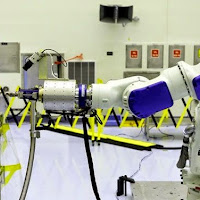
NASA Engineers at Kennedy are performing design and development tests of Remote Robotic Oxidizer Transfer technology

The most recent testing at Kennedy took place in the Payload Hazardous Servicing Facility (PHSF) and has focused on moving from a proof-of-concept phase to building the first engineering development unit. During February 2014, SSCO demonstrated that a remotely operated robot – with supporting technologies – could transfer oxidizer into the tank of another orbiting spacecraft not originally designed to be refueled. Kennedy’s propellant transfer system was an essential part of this Remote Robotic Oxidizer Transfer Test, or RROxiTT.

"The Kennedy folks developed the propellant transfer assembly, what we call the PTA," said Matt Sammons, a robotics tools engineer with Stinger Ghaffarian Technologies Inc. at the SSCO. "We have been working heavily with the robotics and the fueling tools that will receive the propellant from the Kennedy-provided PTA and deliver it to the simulated client satellite."

The team at Goddard shipped an industrial robotic arm to Kennedy for the test. From 800 miles away in Maryland, the team remotely controlled the robotic arm with its attached SSCO oxidizer nozzle tool to connect with a propellant fill and drain valve on the simulated satellite’s servicing panel. Downstream, the Kennedy-provided propellant transfer system and hose delivery assembly flowed oxidizer through the tool into the client fill-drain valve, with all hardware located in the PHSF in Florida.

"We directed the hypergolic propellant to flow at the various flight and client pressures and flow rates to prove the PTA concept worked," Aranyos said. The latest test involved about 45 different Kennedy players who contributed to make it all happen. While the robotic arm was being operated from Goddard, Kennedy personnel monitored operations in the PHSF from an adjacent control room.

“In addition to the individuals working directly on the test, several outside organizations and companies were called upon to provide services such as inert gasses, precision cleaning, component fabrication and other services needed to successfully perform the integrated test,” Snyder said.

Following the mechanical robotic interconnects and leak checks, the Kennedy team performed the transfer of nitrogen tetroxide using flight-like concept of operations parameters. Because of the highly corrosive and toxic nature of the hypergolic propellant, those technicians and engineers required for standby emergency operations in the PHSF high bay, and performing manual portions of the procedures for test setup and post-disconnect operations, wore protective Self-Contained Atmospheric Protective Ensembles, or SCAPE suits. "The focus of the work was not only in the Fluids Division, but included mechanical involvement, the Safety Department, the Ground Operations Directorate, the electrical and controls that were involved, all the wiring and interconnects to Goddard," Aranyos said.

"We have over a thousand different tests we've run to date with Freon, with water and with the hypergolics," Aranyos said. "We now have to get through that series of test data and we're taking that and putting it with lessons learned into the actual flight development specifications which we will use to build and qualify the flight hardware, hopefully starting with the fiscal year 2015 budget." Aranyos says that finding people willing to continue participating in the project has been easy."This project has not only been a challenge, but it's been a lot of fun for the entire team," he said. "I've never had to ask for a volunteer for this project. People just raised their hands and worked nights, weekends, whatever it took to get this job done."

"The project is very dynamic, diverse and exciting," he said. "It's really wonderful to have fun being on the cutting edge of technology. I think what we're doing here in trying to develop and mature technology that has applications in orbit and in the future of the space industry." The success of the recent testing holds many possibilities. On Earth, RROxiTT technologies can also be used to robotically fuel satellites before they launch, keeping humans at a safe distance during an extremely hazardous operation.

The full contingent of operating spacecraft is right around 1,000, with more than 400 in the geosynchronous (GEO) Earth orbit belt some 22,000 miles above Earth. By developing robotic capabilities to repair and refuel these spacecraft in GEO, NASA hopes to add precious years of functional life to satellites and expand options for operators who face unexpected emergencies, tougher economic demands and aging fleets. A geosynchronous equatorial orbit is a circular orbit 22,236 miles above the Earth and thus appears motionless, at a fixed position in the sky, to ground observers.

Phillips believes this also is the beginning of new capabilities for Kennedy, particularly for the center's engineering and design capability."We have largely focused on ground processing and ground operations, and we've earned our expertise in that area," he said. "In this realm, it's literally spacecraft development work and it's venturing out beyond our traditional work. It's challenging our people to be better engineers and better scientists."

Facebook, Google, Twitter and thousands more websites’ Login Protocols Hacked –There is not any FIX for that!

Facebook, Google, Twitter and thousands more websites’ Login Protocols Hacked –There is not any FIX for that!

Facebook, Google, Twitter and thousands more websites’ Login Protocols Hacked –There is not any FIX for that!

--------------------------------------------------------------------------------------------------------------------
Facebook, Google, Twitter and thousands more websites’ Login Protocols Hacked –There is not any FIX for that!


After the world’s biggest data breach ‘Heartbleed,’ a different vulnerabilty has been discovered that could have allowed hackers to attack on your personal data and steal that.

A security flaw in the OAuth and OpenID online login protocols could be used to steal data and redirect users to malicious websites, CNET reports.
This Flaw dubbed “Covert Redirect,” which actually affecting users as a login pop-up based on affected site’s domain, and today, in most cases we are using login pop-up like if we want to log-in into a website through facebook so usually a pop-up opens for Authentication ‘OAUTH.’

Most Important:
This Flaw is not similar like phishing in which you can watch out your URL carefully, actually in this “Instead of using a Fake domain name, Covert Redirect flaw uses the real site address for authentication.”
Authorising the app will transfer your data to the attacker instead of reaching a legitimate site like Facebook or Google. Thus, personal data including email addresses, birth dates, contact lists and even control of the account could be given to hackers.

How to protect yourself?
You must close any of the suspicious-looking tabs that pop up demanding login credentials for Facebook, Google, Twitter, or any other Internet Services that use these open-source protocols.
The Covert Redirect exploit has been discovered by Wang Jing, a Ph.D student at the Nanyang Technological University in Singapore who already contacted Facebook about it. However, Facebook told him that while it “understood the risks associated with OAuth 2.0,” but fixing the bug is “something that can’t be accomplished in the short-term.” “Short of forcing every single application on the platform to use a whitelist,” a simple fix isn’t available.
Wang also contacted other popular sites like Google, Microsoft and LinkedIn, and each one giving him different answers.
Google: The matter was being tracked.
LinkedIn: it would publicly address it in a blog post.
Microsoft: We completed an investigation into the matter, and the security flaw has been discovered on a third-party site, not on one of its own.

WhiteHat Security founder and interim CEO Jeremiah Grossman agreed with Wang’s findings, but also with what Internet companies told him.
“While I can’t be 100 percent certain, I could have sworn I’ve seen a report of a very similar if not identical vulnerability in OAuth. It would appear this issue is essentially a known WONTFIX,” Grossman said. “This is to say, it’s not easy to fix, and any effective remedies would negatively impact the user experience. Just another example that Web security is fundamentally broken and the powers that be have little incentive to address the inherent flaws.”

Source: HackerNewsBulletin.com

Boeing's new spaceship cabin looks like something out of Star Trek

Boeing's new spaceship cabin looks like something out of Star Trek


Boeing's new spaceship cabin looks like something out of Star Trek


-------------------------------------------------------------------------------------------------------------------------------------------
With virgin Galactic dominating the fringes of space Boeing is looking to take the lead on interstellar travel with its futuristic new spaceship
Boeing has taken the wraps off its new spaceship interior and it looks an awful lot like something out of Star Trek. The cabin of the CST-100 spacecraft is the first from Boeing that has been designed for paying passengers, not NASA astronauts.

The sleek interior places considerable emphasis on comfort and space, both words you would hardly associate with the current crop of spaceships.

Boeing has used large windows to help give passengers and the pilot a much wider field of view whilst also showing off the incredible views that would inevitably then follow.

To help move the idea of space travel into the realms of reality Boeing's also transferred a lot of design cues over from its new range of airliners using the company's trademark blue lighting scheme.

Boeing has used large windows to help give passengers and the pilot a much wider field of view whilst also showing off the incredible views that would inevitably then follow.  To help move the idea of space travel into the realms of reality Boeing's also transferred a lot of design cues over from its new range of airliners using the company's trademark blue lighting scheme.


Obviously there's no in-flight entertainment because, well, you'll be in actual space but the seat configuration does allow for hand luggage and up to 10 passengers for short journeys.

With Bigelow looking to launch the first privately owned space station by 2016 Boeing actually plans to have the CST-100 flying passengers by the time the space station is ready.

Source(s)

Facebook users inadvertently hack themselves while trying to hack friends

Facebook users inadvertently hack themselves while trying to hack friends


Facebook users inadvertently hack themselves while trying to hack friends


Facebook users in India have been tricked into hacking their own Facebook accounts – while attempting to hack their friends accounts.

Facebook users inadvertently hack themselves while trying to hack friends
this is how spam looks like


The scam claimed to offer a tool to find out the Facebook passwords of friends, but instead compromised the user’s account by tricking them into using some code that takes control of their account and exposes their friends’ data in the process.

“What really happens when you paste this code into your browser console window is that a series of actions are performed using your Facebook account without your knowledge.

Also read: SCAM: Facebook user accounts are Hijacking by hackers in the name of FB Hacking Tool

"Behind the scenes, your account is used to follow lists and users, and give likes to pages in order to inflate the follower and like counts defined by the scammers,” explained Satnam Narang, a security response manager for Symantec in a blog post.
'Facebook hacking'

The scam employs an instructional video explaining “Facebook Hacking”, which linked to a Google document that contains some code.

The code allows users to see friends’ Facebook passwords, according to the scammers, with the instructions attempting to convince users to paste the code into their browser console window – a feature of most browsers that allows developers to inspect and modify elements of a website and how it is presented in the browser.

The instructions explain that the code will take two hours to work, belaying immediate suspicion when nothing happens to reveal the passwords of their friends.

In reality the code performs actions behind the scenes using the would-be hacker’s Facebook account, including following certain users and liking pages. No doubt the scammers are being paid to artificially inflate the follower or like counts of some users and pages.
'Playing off the curiosity of your friends'

The code also attempts to attract new targets through social engineering on Facebook.

“Your account is also used to tag the names of all your friends in the comment section of the original post. This is done to help the scam spread further, playing off the curiosity of your friends, who may visit the post to find out more and hopefully follow the instructions as well,” explains Narang.

The scam uses a variation of what is called self cross-site scripting (self-XSS), where a user is tricked into entering code into their browser’s console window that performs certain actions on their behalf.
'Allow my account to be hijacked if I paste malicious JavaScript'

Facebook is aware of the scam and has tried to discourage users from falling for it, employing a warning page that blocks scripted actions with an option to manually “allow my account to be hijacked if I paste malicious JavaScript”.

“There is a popular scam going around that claims the user will gain some benefit (illicit access to someone else's account, some new Facebook feature, etc) by pasting some piece of JavaScript into the browser's console,” said Facebook on its JavaScript console warning page.

“The code usually posts the same scam on other people's walls, and subscribes the user to pages controlled by the attacker – but it could do much worse things. To avoid this, the console is now gently disabled in some browsers,” Facebook continues.
'If it sounds too good to be true…'

This type of scam is not new, and was first seen circulating around Facebook in 2011. This scam variant was first seen at the beginning of the year, modified from the original code that saw great success with between 50,000 to 100,000 users falling victim.

The new scam originates from India, according to Symantec, based by the locations of pages and profiles users are tricked into liking as part of the scam.

Users who have been affected by the scam should use their activity log on Facebook to track the errant likes and friending, removing those that the scam artificially created and any post that could spread the scam further.

“Always remember that if it sounds too good to be true, it is. Being able to hack someone’s Facebook password by just pasting some code into your browser sounds way too easy and should signal that this is a scam,” concludes Narang.

ALSO read: Password secrets you must aware and http://www.technotification.com/

Microsoft to announce new Surface on May 20, may switch to Qualcomm for next-gen ARM device

Microsoft to announce new Surface on May 20, may switch to Qualcomm for next-gen ARM device

Microsoft to announce new Surface on May 20, may switch to Qualcomm for next-gen ARM device

Microsoft has signaled that it’s going to update its Surface at an upcoming announcement on May 20 with a new Intel product.

If rumors are accurate, we’ll see a new ARM device as well, possibly powered by a Qualcomm solution rather than the Nvidia SoCs that the company used for both the Surface RT and Surface 2. Surface sales were up by 50% last quarter, with total revenue of $494 million — but the Surface cost of revenue was $539 million, which keeps the entire segment in the hole.

Using Qualcomm for a new miniature Surface (possibly something in the seven to 10 inch range) makes sense for multiple reasons. While Nvidia originally planned to deploy two versions of the Tegra 4, the lower-end Tegra 4i has never shipped in volume to US customers (though the upcoming privacy-focused Blackphone will reportedly use this SoC). Microsoft was likely looking to trim power consumption and performance for its smaller device, and Qualcomm has a number of Snapdragon 600 products that could do it. That doesn’t mean Redmond is unhappy with Nvidia as a partner, but the Tegra manufacturer just may not have had a preferred solution for this segment.

Surface x86: Bay Trail or Haswell?


The other interesting question is whether we’ll see a Bay Trail-powered Surface mini or a point refresh on Surface 2 Pro. The problem with the latter is that Microsoft already did a recent CPU upgrade to the newer Surface; the Core i5-4300U replaced the Core i5-4200U earlier this year. Intel doesn’t really offer anything else that constitutes an improvement in the 15W TDP category — there’s the Core i5-4350U, which swaps CPU clock for additional GPU horsepower, and a Core i7-4510U with a slightly higher top-end frequency and an extra 1MB of L2 cache, but those are pretty slim pickings to hang an upgrade on.

Intel could give Microsoft a limited-edition Broadwell part (effectively launching its 14nm hardware early), but that’s the kind of move that would infuriate every other OEM partner.  The other alternative is that the company will launch two Surface mini tablets — an x86 flavor and ARM one. Whether this bifurcated strategy would confuse customers is an open question — in fact, the entire future of the ARM side of the Windows business is an open question, and one that Microsoft has previously hinted it might resolve by killing its Windows RT business. We know Bay Trail is powering a great many other Windows 8.1 small tablets, so using it in Mini-Surface 2 wouldn’t be unprecedented.

What Microsoft does with its miniature Surface tablet should signal exactly how serious it is about building an ARM ecosystem. If it keeps an ARM flavor in play (regardless of SoC vendor), it’ll mean it remains committed to developing for both architectures. If the Qualcomm rumor isn’t true, then launching an x86 miniature tablet (again, using Haswell or Bay Trail) will signal its decision to move back towards an x86-only shop.

Source : Extreme Tech,technotification


Hackers stealing Google account's passwords smartly through new phishing attack

Hackers stealing Google account's passwords smartly through new phishing attack

Hackers stealing Google account's passwords smartly through new phishing attack


Google account passwords have been stolenby hackers since the beginning of the Internet but as time passed they found,according to Bitdefender,newer and easier ways that are harder to catch with traditional heuristic detection.

Hackers took advantage on how Google Chrome displays their data(URIs-Uniform Resource Identifiers) in their phishing attack, although Mozilla Firefox users suffered from this aswell.

CatalinCosoi, Chief Security Strategist at Bitdefenderexplains what hackers aim for with this scheme:“With access to users’ Google accounts, hackers can buy apps on Google Play, hijack Google+ accounts and access confidential Google Drive documents.The scam starts with an email allegedly sent by Google, with “Mail Notice” or “New Lockout Notice” as a subject.”

Below you can see a photo of an e-mail that frauds use to trick users: “This is a reminder that your email account will be locked out in 24 hours. Due to not being able to increase your Email storage Quota.Go to the INSTANT INCREASE to increase your Email storage automatically.”

gmail phishing

What happens when clicking the INSTANT INCREASE link? Users are redirected to a Google login web page that imitates the authentic one and asks for their credentials.

“What is interesting about this phishing attack is that users end up having the “data:” in their browser’s address bar, which indicates the use of a data URI scheme,” continues Catalin Cosoi.

Schemers manage to include in-line data in web pages as if they were external resources by using Base64 encoding. Base64 encoding role is to represent file contents, supplying the content of the fake web page in an encoded string within the data URI.

It is hard for regular users to understand what is happening,as Google Chrome does not show the whole string so the cyber-criminals exploit their lack of knowledge.

These being said, it is common for scammers to pose as services that contact people by e-mail for announcements or notifications. Among phishers’ favorite disguises we have Google, Facebook, eBay, PayPal, phone services and financial institutions. The most recent attack wanted to access users’ Gmail credentials, by targeting Google Drive’s landing page.

Source: hackernewsbulletin.com
 
Support : Creating Website | Johny Template | Mas Template
Copyright © 2013. Technology Tips - All Rights Reserved
Template Created by Creating Website Published by Mas Template
Proudly powered by Blogger